Cactus Clip Art: Fresh Design for Every Project
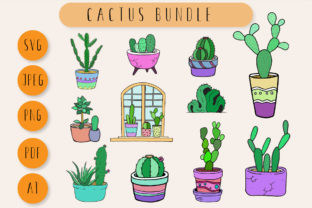
There's something about a cactus that just works in modern design. It's resilient, stylish, and carries a quiet confidence. That same energy is captured in this Cactus Clip Art collection, a versatile set of design assets built for creators who need more than just a single image. This isn't a one-trick pony; it's a toolkit. You get the same set of eleven distinct cactus illustrations delivered in every format you could need: crisp JPEGs, scalable PDFs, transparent PNGs, and editable SVGs. The inclusion of an Adobe Illustrator file is a professional touch, giving you full vector control to customize colors, shapes, and details to match your exact vision. And for those quick, on-the-go projects, there's a bonus PNG formatted specifically for sticker printing.
The appeal here lies in the blend of simplicity and character. These aren't hyper-realistic botanical drawings. They have a clean, graphic style with a touch of whimsy. Think of them as the perfect visual shorthand for themes of growth, resilience, nature, and a laid-back, modern aesthetic. The personality is friendly and approachable, making it an excellent creative font alternative for visual projects where you want to add a human, organic touch without relying on handwritten fonts or script typefaces. It's a visual asset that feels both contemporary and timeless.
Where This Cactus Collection Truly Shines
Understanding where to deploy these assets is key to unlocking their value. Their clean lines and simple forms ensure they scale beautifully, maintaining clarity whether they're small icons on a website or large focal points on a poster. For digital creators and marketers, these are gold. Use the PNG files with transparent backgrounds to layer over social media graphics, create engaging Instagram Stories, or add visual interest to blog headers. The SVG format is perfect for web design, allowing for crisp, fast-loading icons on your site that look sharp on any screen.
In the world of branding and packaging design, a cactus can be a powerful brand identity element. It suggests a brand that is tough, easy to care for, and stylish. Imagine this clip art on product labels for a skincare line, a coffee shop logo, or the packaging for a sustainable goods company. The Illustrator file allows a designer to seamlessly integrate the cactus into a larger logo design or pattern, ensuring brand consistency across all touchpoints. It moves from being a simple image to a core component of a visual system.
For the crafters, hobbyists, and small business owners in the audience, the practical applications are endless. The sticker-ready PNG is a direct line to creating custom planners, laptop decals, or product labels. The PDF and JPEG files are ideal for print projects like scrapbooking, handmade card making, and invitations for a desert-themed wedding or a summer party. The quality is high enough for professional print, ensuring your photo cards and paper crafts look polished and intentional.
Making It Work: A Practical Guide to Using Your Assets
Having the files is one thing; using them effectively is another. The real power of this Cactus Clip Art bundle is in its flexibility. Let's talk about font pairing and visual hierarchy. If you're creating a wedding invitation, you might pair a detailed cactus illustration with an elegant script font for the names and a clean sans serif font for the details. The organic shape of the cactus provides a beautiful contrast to the structured typography, creating a balanced and engaging layout.
For a more corporate or editorial design project, like a presentation or a magazine layout, you could use a simplified cactus icon from the SVG set as a recurring motif. Pair it with a strong serif font for headings to establish authority and a readable sans serif for body text. This approach uses the clip art to reinforce a theme—perhaps for a section on growth or sustainability—without overwhelming the content. It’s about using these design assets to support your message, not shout over it.
Here’s a quick checklist for integrating them into your workflow:
- Evaluate the Style: Does the friendly, graphic style of the cactus match your project's tone? It's perfect for approachable brands but might not suit a ultra-luxury, formal aesthetic.
- Test Color and Scale: Open the SVG or AI file. Can you easily change the green to a brand color? Does the illustration hold its detail when scaled down to a favicon or up to a poster?
- Check the License: This is non-negotiable for any commercial font or asset. Ensure the license covers your intended use, whether it's for client work, merchandise, or digital products you plan to sell.
- Consider the Context: A single cactus can be an icon. A row of them can become a border or pattern. Think beyond the individual image to how you can create a cohesive visual language.
Ultimately, this collection is a smart investment for any creative professional's toolkit. It’s not just about having a picture of a plant; it’s about having a versatile, high-quality visual element that can adapt to dozens of different projects, saving you time and elevating your work. It’s a practical solution to a common design need: finding a unique, consistent, and professional graphic that you can truly make your own.